Every recruiter knows the routine: a hiring manager drops a dense, buzzword-heavy job description into your inbox, and the clock starts ticking.
Before you can review a single candidate, you spend 15 to 20 minutes parsing technical requirements, brainstorming synonyms, and hand-crafting brittle Boolean strings. Miss one key term or state-management framework, and you lock out the best candidates; build it too broad, and you drown in irrelevant profiles.
Firki eliminates that friction directly inside your inbox.
What is Firki?
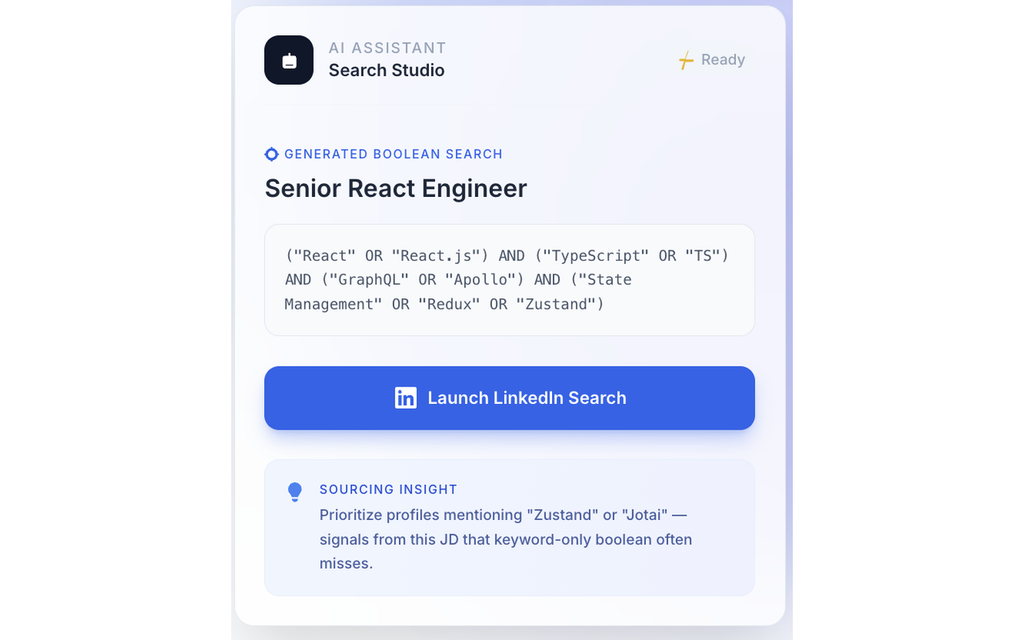
Firki is a lightweight, free Chrome extension built for recruiters and sourcers. It extracts key skills, technologies, and operational requirements from job descriptions in Gmail and Outlook Web, converting them into structured, LinkedIn-ready Boolean search strings in a single click.
No sign-up walls, no clunky external dashboards, and no copy-pasting back and forth between tools.

Why It Solves the “Context Gap”
When recruiters construct manual Boolean strings, up to 60% of the job description’s actual operational context gets lost in translation. A requirement like “experience architecting distributed frontend systems” often gets reduced to just "React" AND "TypeScript", missing the deeper frameworks, libraries, and nuances the team actually cares about.
Firki tackles this by focusing on signal integrity:
- Automated Skill & Syntax Extraction: It analyzes the raw JD email and automatically groups skills into structured Boolean queries (e.g., matching core skills and optional variants with proper
AND/ORnesting). - Actionable Sourcing Insights: Beyond the raw syntax, Firki highlights specific niche libraries or underlying signals mentioned in the JD (like flagging alternative tools or state management libraries) that traditional keyword searches usually overlook.
- Direct LinkedIn Launch: With one click, your generated query opens directly into LinkedIn search, cutting sourcing preparation from 15+ minutes down to seconds.
Key Highlights at a Glance
| Feature | Firki Experience |
| Workflow Location | Works in-place inside Gmail & Outlook Web |
| Search Output | Clean, pre-tested LinkedIn Boolean search strings |
| Friction / Cost | 100% Free · No sign-up wall required |
| Primary Value | Saves ~15 minutes per search while preserving technical context |
The Verdict
Sourcing shouldn’t be about fighting query operators and quotes—it should be about evaluating people. Firki moves recruiters up the workflow, handling the mechanics of search syntax so you can focus on finding and engaging top talent faster.
You can grab the free extension directly on the Chrome Web Store.